Manage Users and Webmasters
- Yi Zhang
- Musa Jatkowski
- Ashley Mattingly
Administrators on an Aurora website can add/remove webmasters and assign the people different roles.
To do this, you will need the NetID or the UConn email address of the person you are adding.
(See all Aurora WordPress Training.)
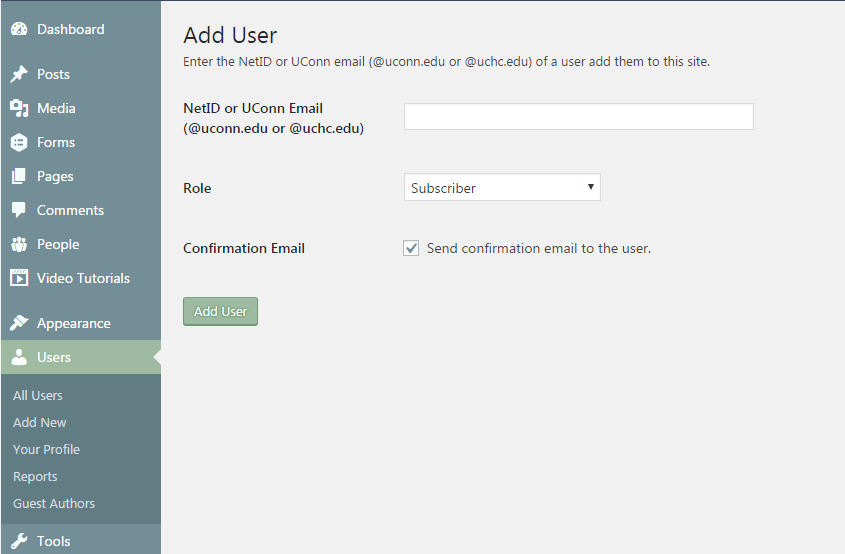
To add a user, log into the site via the "Webmaster Login" link in the footer. Then go to Users > Add New.
Fill in the Form
NetID: Enter the User's NetID or UConn email address.
Affiliate Accounts are available for people outside of UConn who need temporary access to University resources.
Role: Specify the User's Role as one of the following.
Subscriber: Can edit their profile details and access Private Pages and Private Sites when privacy is set to All site users.
Profile User: Same capabilities as Subscriber but can additionally access the Media Library .
Contributor Without Media: Same capabilities as Subscriber but can additionally edit pages they are the Author of. They cannot access the Media Library .
Contributor: Same capabilities as Subscriber but can additionally edit pages they are the Author of. They can access the Media Library .
Author: Same capabilities as Contributor but they can additionally add and publish new pages and delete existing pages.
Editor: Has access to all site content and media but cannot update the appearance or add users.
Administrator: Has full access to the site, can change appearance, and can add users.
Confirmation Email: Uncheck this box to stop the system from sending a confirmation email.